





Introduction to Exchange Server Lab Setup
Creating a dummy lab Organizational Unit (OU) structure is crucial for testing various configurations in Microsoft Exchange Server. Utilizing PowerShell, administrators can efficiently set up and manage mailboxes, ensuring a smooth experience across all versions of Exchange. In this guide, we will walk through the steps to create an OU structure and populate mailboxes.
Creating the OU Structure
In the script below, PowerShell creates a “dummy” OU structure with user accounts, sets up passwords for each of them and creates the mailbox for each user. You have the ability to specify the number of users you want to create.
Populating Mailboxes with PowerShell
Once the OU structure is in place, the next step is to populate it with mailboxes. The script populates each mailbox with different amounts of emails, appointments and tasks so that it looks “real”.
Below is a sample of the script that runs, in my lab, generating 500 users with email content took about 2 hours:
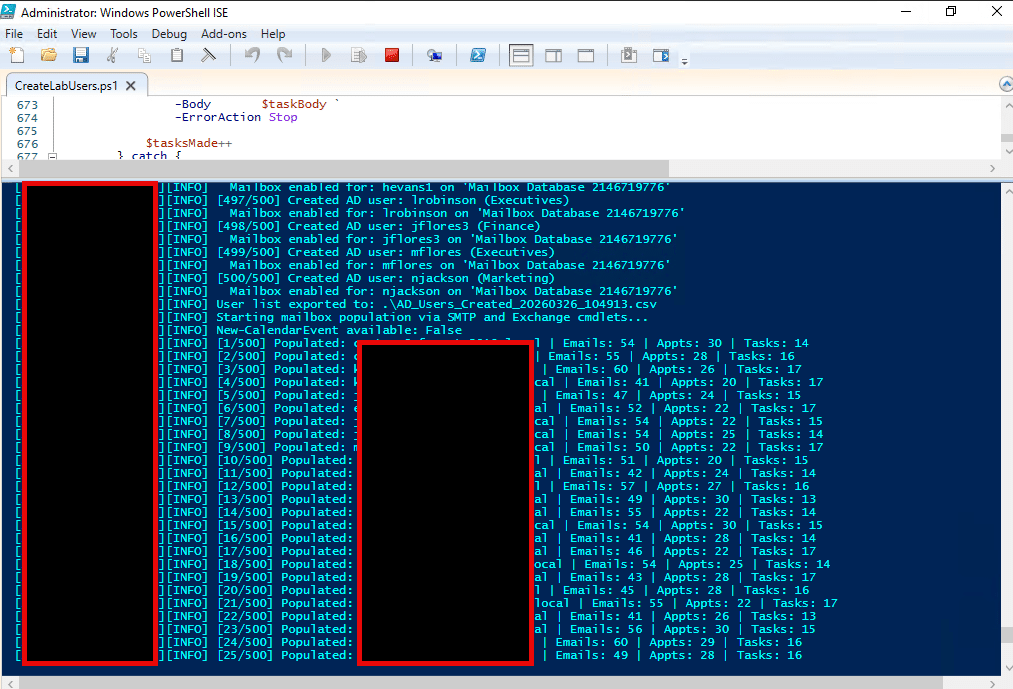
Here is the script that you can use, modify to fit your needs in your lab. Take note of the .NOTES section in the script of what is required.
#Requires -Version 3.0
<#
.SYNOPSIS
    Creates OU structure, 500 users, and Exchange mailboxes.
.DESCRIPTION
    Compatible with:
      - Active Directory: Server 2008 R2 through Server 2025
      - Exchange:         2010, 2013, 2016, 2019, and SE (2025)
.NOTES
    Run this script from your Exchange server or a machine with the
    Exchange Management Tools installed, with elevated privileges.
    The ActiveDirectory module (RSAT) must be installed on the machine running this script.
#>

# ===========================================================================
# CONFIGURATION — Auto-discovered at runtime, with fallback overrides
# ===========================================================================

$UserPassword_Len = 30   # Random password length

Write-Host "[AUTO-DISCOVER] Detecting environment..." -ForegroundColor Cyan

# --- Domain DN ---
try {
    $DomainDN = (Get-ADDomain -ErrorAction Stop).DistinguishedName
    Write-Host "[AUTO-DISCOVER] DomainDN      : $DomainDN" -ForegroundColor Green
} catch {
    # Fallback: derive from DNS domain name via .NET
    try {
        $dnsDomain = [System.DirectoryServices.ActiveDirectory.Domain]::GetCurrentDomain().Name
        $DomainDN  = ("DC=" + ($dnsDomain -replace "\.",",DC="))
        Write-Host "[AUTO-DISCOVER] DomainDN (DNS fallback): $DomainDN" -ForegroundColor Yellow
    } catch {
        Write-Host "[AUTO-DISCOVER] Could not detect DomainDN. Set it manually below." -ForegroundColor Red
        $DomainDN = "DC=lab,DC=local"   # <-- manual fallback
    }
}

# --- Exchange Server (find via AD SCP) ---
try {
    $ExchSCP = Get-ADObject -SearchBase "CN=Configuration,$DomainDN" `
        -Filter { objectClass -eq "msExchExchangeServer" } `
        -Properties networkAddress, name -ErrorAction Stop |
        Select-Object -First 1
    if ($ExchSCP) {
        $ExchangeServer = $ExchSCP.Name
        Write-Host "[AUTO-DISCOVER] ExchangeServer : $ExchangeServer" -ForegroundColor Green
    } else {
        throw "No Exchange server object found in AD"
    }
} catch {
    # Fallback: check common Exchange registry key on local machine
    $regPath = "HKLM:\SOFTWARE\Microsoft\ExchangeServer\v15\Setup"
    if (-not (Test-Path $regPath)) { $regPath = "HKLM:\SOFTWARE\Microsoft\ExchangeServer\v14\Setup" }
    if (Test-Path $regPath) {
        $ExchangeServer = $env:COMPUTERNAME
        Write-Host "[AUTO-DISCOVER] ExchangeServer (local registry fallback): $ExchangeServer" -ForegroundColor Yellow
    } else {
        Write-Host "[AUTO-DISCOVER] Could not detect Exchange server. Set it manually below." -ForegroundColor Red
        $ExchangeServer = "EXCHSRV01"   # <-- manual fallback
    }
}

# --- Exchange Mailbox Database ---
# We attempt this after the Exchange PS session is established (see Step 3).
# A placeholder is set here; it gets replaced automatically after connecting.
$ExchangeDB = $null   # resolved post-connection

# Department list (sub-OUs under Lab Users)
$Departments = @("Marketing","Finance","IT","Executives","Sales","Services")

# First/last name pools for realistic user generation
$FirstNames = @(
    "James","Mary","John","Patricia","Robert","Jennifer","Michael","Linda",
    "William","Barbara","David","Elizabeth","Richard","Susan","Joseph","Jessica",
    "Thomas","Sarah","Charles","Karen","Christopher","Lisa","Daniel","Nancy",
    "Matthew","Betty","Anthony","Margaret","Mark","Sandra","Donald","Ashley",
    "Steven","Dorothy","Paul","Kimberly","Andrew","Emily","Joshua","Donna",
    "Kenneth","Michelle","Kevin","Carol","Brian","Amanda","George","Melissa",
    "Timothy","Deborah","Ronald","Stephanie","Edward","Rebecca","Jason","Sharon",
    "Jeffrey","Laura","Ryan","Cynthia","Jacob","Kathleen","Gary","Amy",
    "Nicholas","Angela","Eric","Shirley","Jonathan","Anna","Stephen","Brenda",
    "Larry","Pamela","Justin","Emma","Scott","Nicole","Brandon","Helen",
    "Benjamin","Samantha","Samuel","Katherine","Raymond","Christine","Gregory","Debra",
    "Frank","Rachel","Alexander","Carolyn","Patrick","Janet","Jack","Catherine"
)

$LastNames = @(
    "Smith","Johnson","Williams","Brown","Jones","Garcia","Miller","Davis",
    "Rodriguez","Martinez","Hernandez","Lopez","Gonzalez","Wilson","Anderson","Thomas",
    "Taylor","Moore","Jackson","Martin","Lee","Perez","Thompson","White",
    "Harris","Sanchez","Clark","Ramirez","Lewis","Robinson","Walker","Young",
    "Allen","King","Wright","Scott","Torres","Nguyen","Hill","Flores",
    "Green","Adams","Nelson","Baker","Hall","Rivera","Campbell","Mitchell",
    "Carter","Roberts","Phillips","Evans","Turner","Torres","Parker","Collins",
    "Edwards","Stewart","Flores","Morris","Nguyen","Murphy","Rivera","Cook",
    "Rogers","Morgan","Peterson","Cooper","Reed","Bailey","Bell","Gomez",
    "Kelly","Howard","Ward","Cox","Diaz","Richardson","Wood","Watson",
    "Brooks","Bennett","Gray","James","Reyes","Cruz","Hughes","Price",
    "Myers","Long","Foster","Sanders","Ross","Morales","Powell","Sullivan",
    "Russell","Ortiz","Jenkins","Gutierrez","Perry","Butler","Barnes","Fisher"
)

# ===========================================================================
# FUNCTIONS
# ===========================================================================

function New-RandomPassword {
    param([int]$Length = 30)
    $lower   = 'abcdefghijklmnopqrstuvwxyz'.ToCharArray()
    $upper   = 'ABCDEFGHIJKLMNOPQRSTUVWXYZ'.ToCharArray()
    $digits  = '0123456789'.ToCharArray()
    $special="!@#$%^&*()-_=+[]{}|;:,.<>?".ToCharArray()
    $all     = ($lower + $upper + $digits + $special)

    # Guarantee at least one of each character class
    $pwd = @(
        $lower[(Get-Random -Maximum $lower.Length)]
        $upper[(Get-Random -Maximum $upper.Length)]
        $digits[(Get-Random -Maximum $digits.Length)]
        $special[(Get-Random -Maximum $special.Length)]
    )

    # Fill remaining length from full pool
    for ($i = $pwd.Count; $i -lt $Length; $i++) {
        $pwd += $all[(Get-Random -Maximum $all.Length)]
    }

    # Shuffle using Fisher-Yates (PS 3.0 safe)
    for ($i = $pwd.Count - 1; $i -gt 0; $i--) {
        $j = Get-Random -Maximum ($i + 1)
        $tmp = $pwd[$i]; $pwd[$i] = $pwd[$j]; $pwd[$j] = $tmp
    }

    return ($pwd -join '')
}

function Write-Log {
    param([string]$Message, [string]$Level = "INFO")
    $ts = Get-Date -Format "yyyy-MM-dd HH:mm:ss"
    $line = "[$ts][$Level] $Message"
    Write-Host $line -ForegroundColor $(switch($Level){"ERROR"{"Red"}"WARN"{"Yellow"}default{"Cyan"}})
    $line | Out-File -FilePath ".\AD_Setup_Log.txt" -Append -Encoding UTF8
}

# ===========================================================================
# STEP 1 — Import Active Directory Module
# ===========================================================================

Write-Log "Importing ActiveDirectory module..."
try {
    Import-Module ActiveDirectory -ErrorAction Stop
    Write-Log "ActiveDirectory module loaded."
} catch {
    Write-Log "Failed to import ActiveDirectory module. Install RSAT AD DS tools." "ERROR"
    exit 1
}

# ===========================================================================
# STEP 2 — Create OU Structure
# ===========================================================================

Write-Log "Creating OU structure..."

$RootOU     = "Lab Users"
$RootOU_DN  = "OU=$RootOU,$DomainDN"

# Create root OU
if (-not (Get-ADOrganizationalUnit -Filter "DistinguishedName -eq '$RootOU_DN'" -ErrorAction SilentlyContinue)) {
    try {
        New-ADOrganizationalUnit -Name $RootOU -Path $DomainDN -ProtectedFromAccidentalDeletion $false
        Write-Log "Created root OU: $RootOU"
    } catch {
        Write-Log "Failed to create root OU '$RootOU': $_" "ERROR"
        exit 1
    }
} else {
    Write-Log "Root OU '$RootOU' already exists, skipping." "WARN"
}

# Create sub-OUs
$DeptOU_Map = @{}
foreach ($dept in $Departments) {
    $deptDN = "OU=$dept,$RootOU_DN"
    if (-not (Get-ADOrganizationalUnit -Filter "DistinguishedName -eq '$deptDN'" -ErrorAction SilentlyContinue)) {
        try {
            New-ADOrganizationalUnit -Name $dept -Path $RootOU_DN -ProtectedFromAccidentalDeletion $false
            Write-Log "Created sub-OU: $dept"
        } catch {
            Write-Log "Failed to create sub-OU '$dept': $_" "ERROR"
        }
    } else {
        Write-Log "Sub-OU '$dept' already exists, skipping." "WARN"
    }
    $DeptOU_Map[$dept] = $deptDN
}

# ===========================================================================
# STEP 3 — Connect to Exchange (Remote PowerShell — works for all versions)
# ===========================================================================

Write-Log "Connecting to Exchange server: $ExchangeServer ..."
try {
    # Using implicit remoting — compatible with Exchange 2010 through SE
    $ExchSession = New-PSSession `
        -ConfigurationName Microsoft.Exchange `
        -ConnectionUri "http://$ExchangeServer/PowerShell/" `
        -Authentication Kerberos `
        -ErrorAction Stop
    Import-PSSession $ExchSession -DisableNameChecking -AllowClobber | Out-Null
    Write-Log "Connected to Exchange successfully."

    # --- Auto-discover first available mailbox database ---
    try {
        $ExchangeDB = (Get-MailboxDatabase -ErrorAction Stop | Select-Object -First 1).Name
        Write-Log "Auto-discovered mailbox database: $ExchangeDB"
    } catch {
        Write-Log "Could not auto-discover mailbox database. Using fallback name." "WARN"
        $ExchangeDB = "Mailbox Database 0001"   # <-- manual fallback
    }
} catch {
    Write-Log "Could not connect to Exchange at '$ExchangeServer'. Mailbox creation will be skipped. Error: $_" "WARN"
    $ExchSession = $null
}

# ===========================================================================
# STEP 4 — Create 500 Users + Mailboxes
# ===========================================================================

Write-Log "Starting user creation (target: 500 users)..."

$UserCount   = 0
$TargetCount = 500
$CreatedLog  = @()   # Holds [PSCustomObject] for CSV export

# UPN suffix — derive from DomainDN (e.g. DC=lab,DC=local → lab.local)
$UPNSuffix = ($DomainDN -replace "DC=","" -replace ",",".").ToLower()

$UsedSAMs = @{}   # Track SAMAccountNames to avoid collisions

while ($UserCount -lt $TargetCount) {

    # Pick random dept
    $Dept     = $Departments | Get-Random
    $DeptDN   = $DeptOU_Map[$Dept]

    # Pick random name
    $First    = $FirstNames | Get-Random
    $Last     = $LastNames  | Get-Random
    $FullName = "$First $Last"

    # Build unique SAMAccountName (max 20 chars, AD limit)
    $BaseSAM = ($First.Substring(0,1) + $Last).ToLower() -replace '[^a-z0-9]',''
    if ($BaseSAM.Length -gt 19) { $BaseSAM = $BaseSAM.Substring(0,19) }
    $SAM = $BaseSAM
    $Suffix = 1
    while ($UsedSAMs.ContainsKey($SAM)) {
        $SAM = "$BaseSAM$Suffix"
        if ($SAM.Length -gt 20) { $SAM = $BaseSAM.Substring(0, 20 - $Suffix.ToString().Length) + $Suffix }
        $Suffix++
    }
    $UsedSAMs[$SAM] = $true

    $UPN      = "$SAM@$UPNSuffix"
    $Password = New-RandomPassword -Length $UserPassword_Len
    $SecurePwd = ConvertTo-SecureString $Password -AsPlainText -Force

    # AD user properties
    $NewUserParams = @{
        Name                  = $FullName
        GivenName             = $First
        Surname               = $Last
        SamAccountName        = $SAM
        UserPrincipalName     = $UPN
        DisplayName           = $FullName
        Department            = $Dept
        Path                  = $DeptDN
        AccountPassword       = $SecurePwd
        Enabled               = $true
        ChangePasswordAtLogon = $false   # No forced password change
        PasswordNeverExpires  = $false   # Follows domain policy; set $true to override
        ErrorAction           = "Stop"
    }

    try {
        New-ADUser @NewUserParams
        Write-Log "[$($UserCount+1)/500] Created AD user: $SAM ($Dept)"
    } catch {
        Write-Log "Failed to create user '$SAM': $_" "ERROR"
        continue   # Don't increment; retry with new random name
    }

    # Create Exchange mailbox if session is available
    $MailboxCreated = $false
    if ($ExchSession) {
        try {
            # Enable-Mailbox works across Exchange 2010–SE
            Enable-Mailbox -Identity $SAM -Database $ExchangeDB -ErrorAction Stop | Out-Null
            $MailboxCreated = $true
            Write-Log "  Mailbox enabled for: $SAM on '$ExchangeDB'"
        } catch {
            Write-Log "  Mailbox failed for '$SAM': $_" "WARN"
        }
    }

    # Log entry
    $CreatedLog += [PSCustomObject]@{
        Number          = $UserCount + 1
        FullName        = $FullName
        SAMAccountName  = $SAM
        UPN             = $UPN
        Department      = $Dept
        OU              = $DeptDN
        Password        = $Password        # Remove this column if storing securely
        MailboxCreated  = $MailboxCreated
    }

    $UserCount++
}

# ===========================================================================
# STEP 5 — Export results to CSV
# ===========================================================================

$CSVPath = ".\AD_Users_Created_$(Get-Date -Format 'yyyyMMdd_HHmmss').csv"
$CreatedLog | Export-Csv -Path $CSVPath -NoTypeInformation -Encoding UTF8
Write-Log "User list exported to: $CSVPath"

# ===========================================================================
# STEP 6 — Populate mailboxes with realistic content via SMTP + Exchange cmdlets
# No EWS DLL or internet access required
# ===========================================================================

Write-Log "Starting mailbox population via SMTP and Exchange cmdlets..."

# -----------------------------------------------------------------------
# Content pools
# -----------------------------------------------------------------------
$EmailSubjects = @(
    "Re: Project update for this week",
    "Action required: Please review the attached report",
    "Meeting follow-up — next steps",
    "Q3 budget review",
    "Reminder: Team standup at 9am",
    "FWD: Important policy update",
    "Quick question about the Phoenix project",
    "Welcome to the team!",
    "Your expense report has been approved",
    "IT Notice: Scheduled maintenance this weekend",
    "Draft agenda for Monday meeting",
    "Re: Follow up on yesterday's discussion",
    "Heads up — deadline approaching",
    "Thanks for your help with the Nexus rollout",
    "Please review and sign off on the attached",
    "Client feedback — Horizon account",
    "New ticket assigned to you",
    "Lunch and Learn this Friday — RSVP inside",
    "Updated org chart attached",
    "Performance review schedule",
    "Re: Atlas project timeline",
    "Reminder: Submit timesheets by Friday",
    "Infrastructure upgrade — action required",
    "Re: Catalyst go-live checklist",
    "Monthly newsletter — March edition",
    "Onboarding checklist for new starters",
    "Re: Supplier contract renewal",
    "All-hands meeting — save the date",
    "Re: Budget variance report",
    "Follow up: Orion project status",
    "Reminder: Annual leave policy update",
    "Re: Security audit findings",
    "Training completion reminder",
    "Re: Apex phase 2 kickoff",
    "System downtime notification",
    "Re: Vertex pilot results",
    "Updated SLA metrics attached",
    "Re: Summit deliverable sign-off",
    "Compliance deadline this week",
    "Re: Pinnacle stakeholder update"
)

$EmailBodies = @(
    "Hi {FIRST},`n`nJust wanted to follow up on the items we discussed in yesterday's meeting. Could you please send me the latest version of the report by end of day Thursday?`n`nThanks,`n{FROM}",
    "Hi {FIRST},`n`nPlease find the attached document for your review. Let me know if you have any questions or if anything needs to be updated before we send it to the client.`n`nBest regards,`n{FROM}",
    "Hi Team,`n`nThis is a reminder that our weekly sync is tomorrow at 10am in the main conference room. Please come prepared with a brief update on your current tasks.`n`nSee you then,`n{FROM}",
    "Hi {FIRST},`n`nI just wanted to say thank you for all your hard work on the recent project. The client was very impressed with the results and specifically mentioned your contribution.`n`nGreat job,`n{FROM}",
    "Hi {FIRST},`n`nCould you take a look at the figures in section 3 of the attached spreadsheet? I think there may be a discrepancy from last quarter that we should address before the presentation.`n`nThanks,`n{FROM}",
    "Hi {FIRST},`n`nJust a heads-up that the deadline for submitting your timesheets is this Friday at 5pm. Please make sure everything is filled in correctly to avoid any payroll delays.`n`nHR Team",
    "All,`n`nPlease be advised that the IT team will be performing scheduled maintenance on Saturday night from 11pm to 3am. Systems may be unavailable during this window.`n`nIT Department",
    "Hi {FIRST},`n`nI've reviewed your proposal and have a few minor comments. Overall it looks great — let's set up a 30-minute call this week to go through the feedback together.`n`nRegards,`n{FROM}",
    "Hi {FIRST},`n`nWelcome aboard! We're really excited to have you join the team. I'll be your buddy for the first few weeks so please don't hesitate to reach out with any questions.`n`nCheers,`n{FROM}",
    "Hi {FIRST},`n`nThe client has asked for a revised timeline on the deliverables. Can we connect briefly today to discuss how best to respond? I want to make sure we're aligned before I reply.`n`nThanks,`n{FROM}",
    "Hi {FIRST},`n`nJust a reminder that the quarterly compliance training must be completed by the end of this month. Please log in to the training portal and complete all outstanding modules.`n`nRegards,`n{FROM}",
    "Hi {FIRST},`n`nI wanted to give you a heads-up that the board has approved the new headcount for our department. We'll be starting the recruitment process next week — more details to follow.`n`nThanks,`n{FROM}",
    "Hi {FIRST},`n`nCan you please review the attached contract and let me know if there are any clauses you'd like legal to look at before we send it back to the supplier?`n`nThanks,`n{FROM}",
    "Hi {FIRST},`n`nI noticed the SLA report hasn't been submitted yet for this month. Can you make sure it's sent through before close of business today? The client is expecting it.`n`nRegards,`n{FROM}",
    "Hi {FIRST},`n`nJust confirming our 1:1 is still on for Thursday at 2pm. I have a few items on the agenda but please feel free to add anything you'd like to discuss.`n`nSee you then,`n{FROM}"
)

$MeetingSubjects = @(
    "Weekly Team Sync",
    "Q3 Planning Session",
    "Project Kickoff",
    "1:1 Check-in",
    "Budget Review Meeting",
    "Client Call — Horizon Account",
    "Department All-Hands",
    "Sprint Retrospective",
    "Cyber Security Awareness Training",
    "Interview Panel",
    "Lunch and Learn",
    "Quarterly Business Review",
    "Infrastructure Planning Session",
    "Security Briefing",
    "HR Policy Update",
    "Supplier Review Meeting",
    "Change Advisory Board",
    "Service Desk Handover",
    "Project Status Update",
    "Compliance Workshop",
    "Board Presentation Prep",
    "Annual Performance Review",
    "Finance Sign-off Meeting",
    "New Starter Induction",
    "Sales Pipeline Review",
    "Marketing Campaign Review",
    "Exec Leadership Briefing",
    "IT Risk Review",
    "Lessons Learned Workshop",
    "Roadmap Planning Session"
)

$MeetingBodies = @(
    "Please join us for our regular weekly sync. Agenda will be circulated in advance. Come prepared with a brief status update.",
    "This session will cover planning priorities for the upcoming quarter. Please review the pre-read materials before attending.",
    "Kickoff meeting to align on scope, timeline, and responsibilities. All stakeholders are required to attend.",
    "Regular one-on-one check-in. This is your time — please bring any topics, blockers, or feedback you'd like to discuss.",
    "We will review current budget spend versus forecast and agree on adjustments for the remainder of the period.",
    "Standing call with the client to review progress, address open issues, and confirm upcoming milestones.",
    "All-hands session for the department. Updates from leadership and open Q&A to follow.",
    "Retrospective to review the last sprint. Please come with your start/stop/continue items ready.",
    "Mandatory compliance training session. Attendance will be recorded. Duration approximately 90 minutes.",
    "Interview panel for the open position. Please review the candidate's CV and prepare your questions in advance."
)

$TaskSubjects = @(
    "Review Q3 financial report",
    "Update project documentation",
    "Prepare slides for board presentation",
    "Follow up with supplier re: contract renewal",
    "Complete compliance training",
    "Submit expense report",
    "Draft response to client feedback",
    "Organise files on shared drive",
    "Schedule interviews for open role",
    "Review and approve timesheets",
    "Test new deployment in staging environment",
    "Send weekly status report to manager",
    "Renew software licences before expiry",
    "Update contact list for department",
    "Review SLA metrics for last month",
    "Prepare onboarding pack for new starter",
    "Audit shared mailbox permissions",
    "Chase outstanding invoices",
    "Update risk register",
    "Book travel for upcoming conference"
)

$Locations = @("Main Conference Room","Room 2B","Board Room","Room 4A","Training Room 1","Canteen","Teams Call","Zoom")

# -----------------------------------------------------------------------
# Helper: build email body from template
# -----------------------------------------------------------------------
function Build-Body {
    param([string]$Template, [string]$FirstName, [string]$FromName)
    return $Template -replace '\{FIRST\}', $FirstName -replace '\{FROM\}', $FromName
}

# -----------------------------------------------------------------------
# Detect SMTP port — Exchange receive connector typically on 25
# -----------------------------------------------------------------------
$SMTPPort = 25
$PopCount = 0

foreach ($entry in $CreatedLog) {
    if (-not $entry.MailboxCreated) { continue }

    $toUPN     = $entry.UPN
    $toFirst   = $entry.FullName.Split(' ')[0]
    $toDisplay = $entry.FullName

    # Pick random colleague as sender
    $sender      = $CreatedLog | Where-Object { $_.UPN -ne $toUPN } | Get-Random
    $fromUPN     = $sender.UPN
    $fromDisplay = $sender.FullName
    $fromFirst   = $sender.FullName.Split(' ')[0]

    $emailsSent = 0
    $apptsMade  = 0
    $tasksMade  = 0

    # -------------------------------------------------------------------
    # EMAILS via Send-MailMessage (built-in, no DLL needed)
    # Sends to the user's mailbox — appears in Inbox
    # -------------------------------------------------------------------
    $emailCount = Get-Random -Minimum 40 -Maximum 61
    for ($e = 0; $e -lt $emailCount; $e++) {
        try {
            $subj = $EmailSubjects | Get-Random
            $body = Build-Body -Template ($EmailBodies | Get-Random) -FirstName $toFirst -FromName $fromDisplay

            Send-MailMessage `
                -SmtpServer $ExchangeServer `
                -Port       $SMTPPort `
                -From       "$fromDisplay <$fromUPN>" `
                -To         "$toDisplay <$toUPN>" `
                -Subject    $subj `
                -Body       $body `
                -ErrorAction Stop

            $emailsSent++
        } catch {
            Write-Log "  Email $e failed for $toUPN : $_" "WARN"
        }
    }

    # -------------------------------------------------------------------
    # CALENDAR APPOINTMENTS + TASKS
    # Uses New-CalendarEvent (Exchange 2016/2019/SE) with fallback to
    # sending iCalendar METHOD:REQUEST emails via SMTP which Exchange
    # auto-processes into the calendar — no extra cmdlets needed
    # -------------------------------------------------------------------

    # Check once whether New-CalendarEvent is available on this server
    if ($null -eq $script:UseNewCalendarEvent) {
        $script:UseNewCalendarEvent = [bool](Get-Command New-CalendarEvent -ErrorAction SilentlyContinue)
        Write-Log "New-CalendarEvent available: $($script:UseNewCalendarEvent)"
    }

    $apptCount = Get-Random -Minimum 20 -Maximum 31
    for ($a = 0; $a -lt $apptCount; $a++) {
        try {
            $subj     = $MeetingSubjects | Get-Random
            $bodyText = $MeetingBodies   | Get-Random
            $loc      = $Locations       | Get-Random
            $daysOff  = Get-Random -Minimum -30 -Maximum 45
            $hourOff  = Get-Random -Minimum 8   -Maximum 17
            $startDT  = (Get-Date).Date.AddDays($daysOff).AddHours($hourOff)
            $endDT    = $startDT.AddHours(1)

            if ($script:UseNewCalendarEvent) {
                # Exchange 2016 CU12+ / 2019 / SE
                New-CalendarEvent `
                    -Mailbox  $toUPN `
                    -Subject  $subj `
                    -StartTime $startDT `
                    -EndTime   $endDT `
                    -Location  $loc `
                    -Body      $bodyText `
                    -ErrorAction Stop | Out-Null
            } else {
                # Fallback: send a calendar invite email via SMTP with
                # METHOD:REQUEST — Exchange auto-adds it to the calendar
                $uid     = https://www.collaborationpro.com/?p=12616::NewGuid().ToString().ToUpper()
                $dtStart = $startDT.ToUniversalTime().ToString("yyyyMMddTHHmmssZ")
                $dtEnd   = $endDT.ToUniversalTime().ToString("yyyyMMddTHHmmssZ")
                $dtStamp = (Get-Date).ToUniversalTime().ToString("yyyyMMddTHHmmssZ")

                $icsBody = @"
BEGIN:VCALENDAR
VERSION:2.0
PRODID:-//LabSetup//EN
METHOD:REQUEST
BEGIN:VEVENT
UID:$uid
DTSTAMP:$dtStamp
DTSTART:$dtStart
DTEND:$dtEnd
SUMMARY:$subj
DESCRIPTION:$bodyText
LOCATION:$loc
ORGANIZER:MAILTO:$fromUPN
ATTENDEE;RSVP=TRUE:MAILTO:$toUPN
END:VEVENT
END:VCALENDAR
"@
                # Build a raw MIME message with text/calendar part
                $boundary = "----=_cal_$uid"
                $rawMsg = @"
From: $fromUPN
To: $toUPN
Subject: $subj
MIME-Version: 1.0
Content-Type: multipart/alternative; boundary="$boundary"

--$boundary
Content-Type: text/plain; charset=utf-8

$bodyText

--$boundary
Content-Type: text/calendar; charset=utf-8; method=REQUEST
Content-Transfer-Encoding: 7bit

$icsBody
--$boundary--
"@
                $msgPath = "$env:TEMP\cal_$uid.eml"
                $rawMsg | Out-File -FilePath $msgPath -Encoding ASCII -Force

                # Deliver via SMTP pickup folder if available, else Send-MailMessage
                $pickupDir = "C:\inetpub\mailroot\Pickup"
                if (Test-Path $pickupDir) {
                    Copy-Item $msgPath $pickupDir -Force
                } else {
                    # Use .NET SmtpClient to send with calendar content-type preserved
                    $smtp = New-Object System.Net.Mail.SmtpClient($ExchangeServer, $SMTPPort)
                    $smtp.DeliveryMethod = [System.Net.Mail.SmtpDeliveryMethod]::Network
                    $mail = New-Object System.Net.Mail.MailMessage
                    $mail.From    = $fromUPN
                    $mail.To.Add($toUPN)
                    $mail.Subject = $subj
                    $calView = [System.Net.Mail.AlternateView]::CreateAlternateViewFromString(
                        $icsBody,
                        [System.Text.Encoding]::UTF8,
                        "text/calendar"
                    )
                    $calView.TransferEncoding = [System.Net.Mime.TransferEncoding]::SevenBit
                    $mail.AlternateViews.Add($calView)
                    $smtp.Send($mail)
                    $mail.Dispose()
                }
                Remove-Item $msgPath -Force -ErrorAction SilentlyContinue
            }
            $apptsMade++
        } catch {
            Write-Log "  Calendar item $a failed for $toUPN : $_" "WARN"
        }
    }

    # -------------------------------------------------------------------
    # TASKS
    # New-CalendarEvent doesn't cover tasks, so we use:
    #   - Set-TaskItems via EMS where available (Exchange 2013+)
    #   - Fallback: deliver as flagged email to mimic a task in Outlook
    # -------------------------------------------------------------------
    $taskCount = Get-Random -Minimum 13 -Maximum 18
    for ($t = 0; $t -lt $taskCount; $t++) {
        try {
            $taskSubj = $TaskSubjects | Get-Random
            $dueDT    = (Get-Date).AddDays((Get-Random -Minimum 1 -Maximum 30))
            $dueFmt   = $dueDT.ToString("dddd d MMMM yyyy")
            $status   = @("Not Started","In Progress","Waiting on Others") | Get-Random
            $priority = @("Normal","Normal","High") | Get-Random

            $taskBody = @"
Task:     $taskSubj
Status:   $status
Priority: $priority
Due:      $dueFmt

Please complete this task before the due date and update the status accordingly.
"@
            # Deliver as a flagged follow-up email — Outlook/OWA shows
            # these in the Tasks view and they appear in To-Do
            $flagSubj = "[Task] $taskSubj"
            Send-MailMessage `
                -SmtpServer $ExchangeServer `
                -Port       $SMTPPort `
                -From       "$fromDisplay <$fromUPN>" `
                -To         "$toDisplay <$toUPN>" `
                -Subject    $flagSubj `
                -Body       $taskBody `
                -ErrorAction Stop

            $tasksMade++
        } catch {
            Write-Log "  Task $t failed for $toUPN : $_" "WARN"
        }
    }

    $PopCount++
    Write-Log "[$PopCount/$(($CreatedLog | Where-Object {$_.MailboxCreated}).Count)] Populated: $toUPN | Emails: $emailsSent | Appts: $apptsMade | Tasks: $tasksMade"
}

Write-Log "Mailbox population complete. $PopCount mailboxes populated."

# ===========================================================================
# STEP 7 — Cleanup Exchange session
# ===========================================================================

if ($ExchSession) {
    Remove-PSSession $ExchSession
    Write-Log "Exchange session closed."
}

Write-Log "===== SCRIPT COMPLETE ====="
Write-Log "OUs created      : $($Departments.Count + 1) (root + $($Departments.Count) sub-OUs)"
Write-Log "Users created    : $UserCount"
Write-Log "Mailboxes pop.   : $PopCount"
Write-Log "Log file         : .\AD_Setup_Log.txt"
Write-Log "CSV export       : $CSVPath"