





In our last article, you received the information on everything Cryptohopper can do—price, features, and actual user reviews. Now you wish to learn how to begin trading on Cryptohopper. It’s time to get started and begin trading. You may be a beginner willing to try out automated trading or a seasoned investor looking to trial custom algorithms, and it is easy and straightforward to set up Cryptohopper.
In this simple-to-follow tutorial, we’ll guide you through the setup of your very first trading bot with Cryptohopper in a step-by-step manner.
Cryptohopper Setup Guide
Now that you’re ready to start using Cryptohopper, follow these simple steps to sign up for your account and fire up your very first trading bot:
Step 1: Sign Up
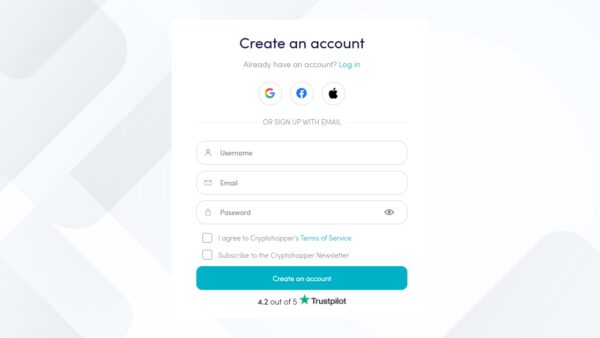
First thing, go to cryptohopper.com. Click on the “Sign Up” button at the top right. You can register using your email address or sign in with a Google, Apple, or Facebook account. Set a secure password and confirm your email to get started.
Step 2: Start the Setup Wizard
After your account has been created, Cryptohopper will open the Config Wizard automatically. Here, you’ll put in your full name and resident country to tailor your account.
Step 3: Connect Your Exchange
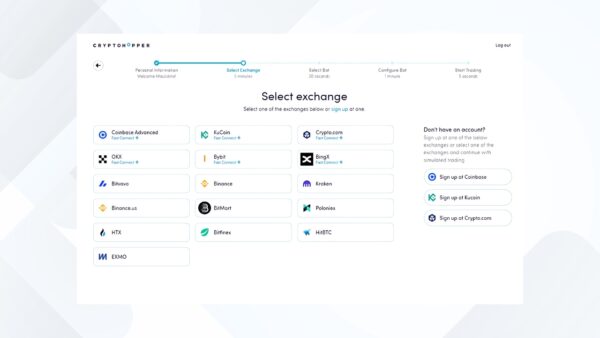
Cryptohopper allows you to use popular exchanges such as Binance, Coinbase, KuCoin, Kraken, among others. Select your desired exchange from the list.
Some exchanges have Fast Connect, where you can log in immediately with a single click. Not ready to connect yet? You can begin with Paper Trading or click “Skip for now” and connect afterwards.
Step 4: Add API Keys
In order to have Cryptohopper trade for you, you’ll need to include API keys from the exchange you’ve selected. Don’t worry—Cryptohopper gives you a step-by-step guide for every exchange.
Security Note: API keys allow the bot to trade, not withdraw. You have complete control of your funds.
Step 5: Choose Your Quote Currency
Next choose your quote currency—the base currency the bot will use to purchase and sell crypto. Typical choices are USDT, BTC, ETH, or EUR, depending upon which exchange and region you use. You can alter this later if necessary.
Step 6: Select a Bot Type
Then, you’ll select how you wish your bot to run. Cryptohopper provides flexible choices:
- Copy Bot – Replicate trades from experienced traders (great for beginners)
- Trading Signals – Copy buy/sell notifications from signal providers
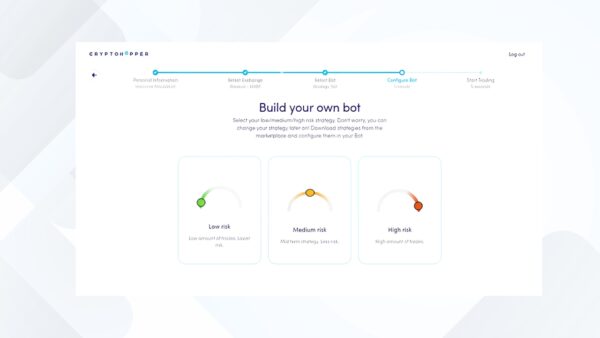
- Quick Bot Builder – Create a simple bot with your desired risk level (low, medium, high)
- Custom Bot – Manually configure your strategy with maximum control (ideal for advanced users)

Step 7: Configure Your Bot
Depending on your bot type, you are now able to fine-tune its actions:
- Set your risk level and strategy
- Turn on or off individual indicators (RSI, MACD, etc.)
- Move stop-loss, trailing stop-buy, and DCA (Dollar Cost Averaging)
- Load a pre-designed template or begin from scratch
You can always go back and adjust these settings at any time through your dashboard.
Step 8: Choose a Pricing Plan
After your bot is set up, you’ll be asked to select a subscription plan. Cryptohopper has four plans:
- Pioneer (Free) – Experiment with manual or paper trading without auto-trading
- Explorer – Minimal automation + strategy creator
- Adventurer – Additional features, greater limits
- Hero – Complete access, suitable for professionals
Tip: You can “Skip Subscription” if you prefer to test the platform first with manual or paper trading.

Step 9: Complete Payment
If you opt for a paid plan, fill in your payment details, address, and choose your payment method. When finished, click “Complete Order”—and you’re now a Cryptohopper user with full automation at your fingertips.
Helpful Tips for First-Time Users
Working with a crypto bot can be intimidating at first, but Cryptohopper simplifies things with these newbie-friendly features and pointers:
- Start with Paper Trading: If you’re not sure how your strategy will perform, paper trading is your best friend. It simulates real trades with fake money so you can practice without any risk.
- Use Pre-Built Templates: Not sure how to build a strategy? Use one of Cryptohopper’s ready-made templates or copy strategies from the Marketplace.
- Take Advantage of Backtesting: Before you launch your bot with real funds, use the backtesting tool. It shows how your strategy would have performed in the past, giving you confidence (or caution) before going live.
- Enable Notifications: Turn on alerts for trade executions, errors, or performance changes. That way, you’re always in the loop, even when you’re not logged in.
- Stay Updated: Crypto markets evolve quickly. Revisit your bot settings every few weeks to adjust for new trends, news, or market shifts.
- Join the Community: Cryptohopper has an active community and knowledge base where you can learn from other traders, ask questions, and find inspiration.
These simple practices will help you get the most out of your Cryptohopper experience while keeping your learning curve smooth and your risk levels low.
Adapting to Market Conditions
Cryptohopper is designed to adjust to different types of markets—bullish, bearish, or flat. Here’s how it works:
- Bull Market: When prices are going up, Cryptohopper can lock in profits using features like trailing stop-loss. This means your bot sells automatically after a price surge to protect your gains.
- Bear Market: If the market is falling, you can use strategies like short selling (on supported exchanges) or set up your bot to buy during dips and wait for the price to recover.
- Sideways Market: When prices aren’t moving much, the bot can focus on small buy-low/sell-high trades. This helps you make profits even during slow or flat market conditions.
You’re Ready to Trade!
That’s it! Your bot is now ready to start trading 24/7 based on the strategy you’ve chosen. You can monitor performance through the dashboard or the Cryptohopper mobile app, make adjustments, or even switch bots as you learn more.
Whether you’re mirroring a pro with Copy Bot or running custom AI-driven strategies, Cryptohopper gives you the tools to take control of your crypto journey in 2025.
Pro Tip: Use paper trading first to test your ideas without risk. Then move to real trading once you’re confident.
Happy trading!