





Outlook offers a feature that automatically suggests replies to emails. This can be a great time-saver when you need to quickly respond to yes-or-no type of questions. However, as for all new features, this one has its fans and those who could definitively live without it. If you feel like a member of the second group, here you will find the instructions on how to turn off suggested replies in Outlook across different platforms.
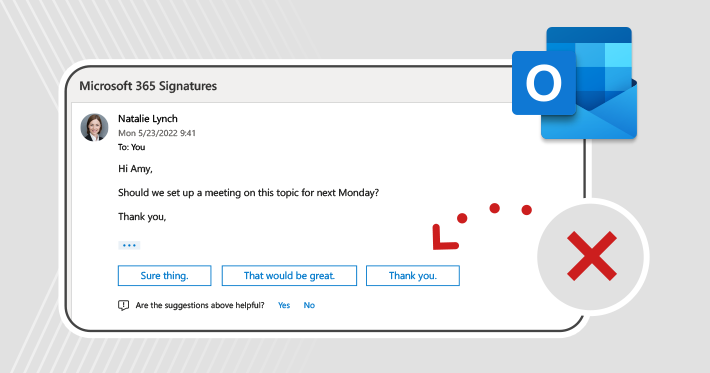
How Outlook suggested replies work?
The Outlook suggested replies feature works as follows: the Microsoft’s Artificial Intelligence (AI) technology analyzes the contents (body) of every email you receive. Based on that analysis, it shows you a set of ready-made short responses, like the ones you can see in the picture below:
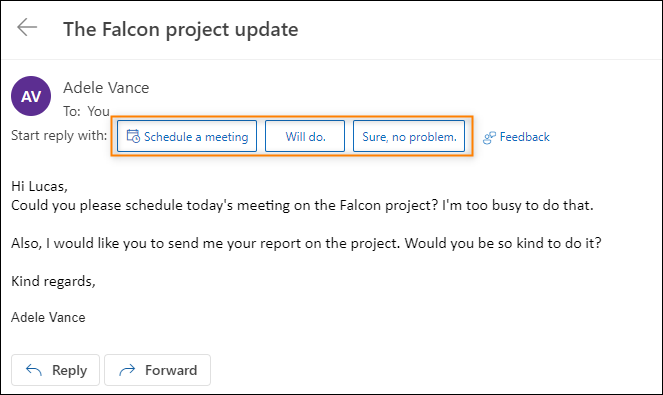
The main idea behind it is to speed up the workflow. You can simply click one of the proposed responses to quickly insert it into your reply and then just hit Send. It lets you spend as little time as possible on replying to emails.
But there’s flexibility to it as well. You can, of course, ignore the suggestions and start composing your own reply. You can also click one of the suggested replies to insert them into the email’s body and then supplement that text with your own words.
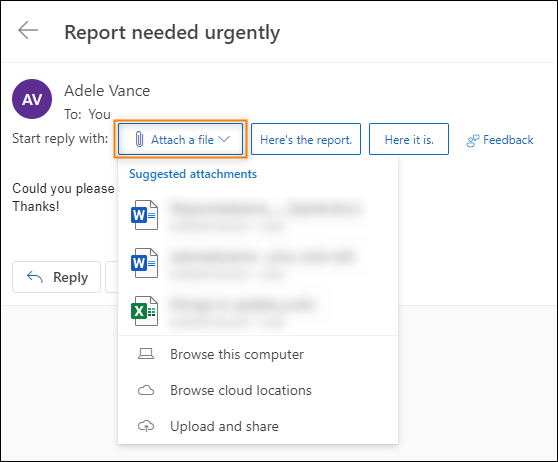
What’s important, suggested replies are not only about… replies. For example, if a sender asks you in an email to schedule a meeting or attach a file, the AI will offer you a shortcut button to schedule a meeting in Microsoft Teams (see previous screenshot) or add an attachment from your hard drive, as shown below:
What’s also a characteristic of AI-based solutions, the Outlook suggested replies can learn from your choices over time, becoming smarter, more accurate, and simply better.
Availability across platforms
Originally, Microsoft released the suggested replies feature to the wide audience around March 2021. Currently, it is supported by the following platforms:
- Outlook for Microsoft 365
- Outlook 2021, 2019, and 2016
- Outlook on the web (OWA)
- Outlook.com
- Outlook for Android
- Outlook for iOS
and the following languages: Arabic, Chinese Simplified, Chinese Traditional, Czech, Danish, Dutch, English, French, German, Hebrew, Hungarian, Italian, Japanese, Korean, Norwegian, Polish, Portuguese, Russian, Spanish, Swedish, Thai, and Turkish.
How to disable suggested replies – a step-by-step guide
I’ve prepared the guide below for users who look for the instruction on how to turn suggested replies off. So if you simply feel irritated by them or have data security concerns about AI analyzing your email contents, go ahead and follow one of the below step-by-step guides.
Outlook for Windows
- Click the File tab on the Outlook ribbon and choose Options from the left-hand menu.
- In the Outlook Options window, click the Mail tab in the left-hand menu, uncheck the Show suggested replies checkbox (in the Replies and forwards section) and click OK to close the window and apply your changes.
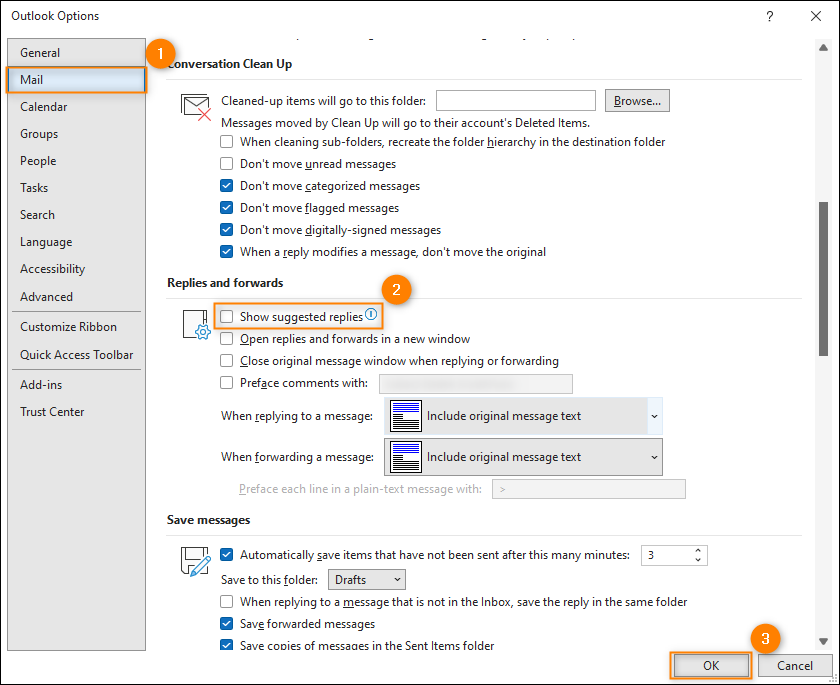
And that’s it. From now on, you won’t get any AI-based reply suggestions.
Outlook on the web (OWA) and Outlook.com
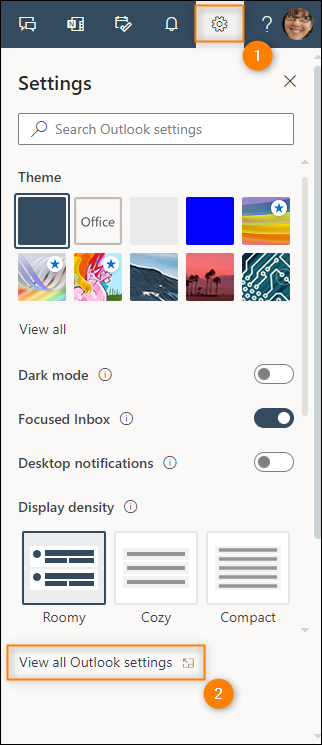
- To access settings for OWA/Outlook.com, click the cogwheel icon in the top right corner and then click the View all Outlook settings link.
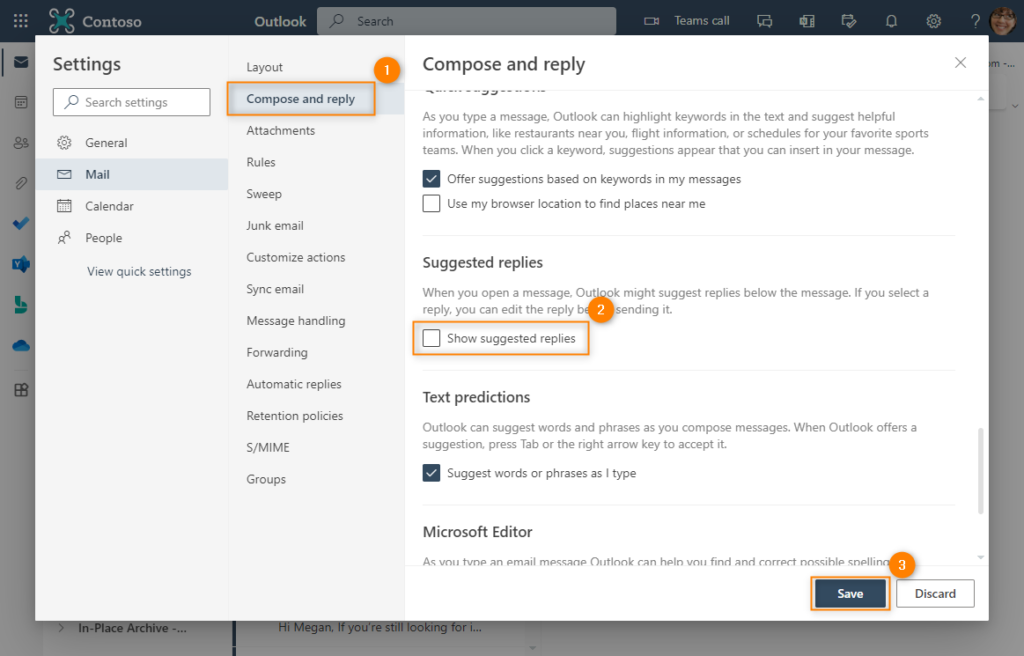
- Next, click the Compose and reply tab (the Mail tab should be selected by default), uncheck the Show suggested replies checkbox and click Save to close the settings window and apply your changes.
Whoa! You’ve just freed yourself from suggested replies in a web version of the Microsoft’s most popular email client.
Outlook mobile apps
The below steps are identical for both Outlook for Android and Outlook for iOS.
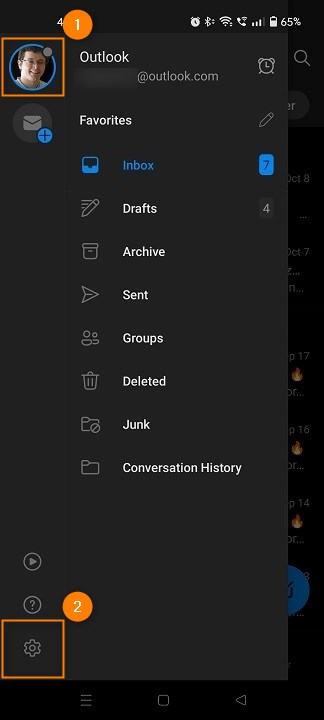
- Access the Outlook mobile settings by tapping the user’s avatar in the top left corner and then the cogwheel icon in the bottom left corner.
- In the next step, select the mailbox for which you want to turn suggested replies off.
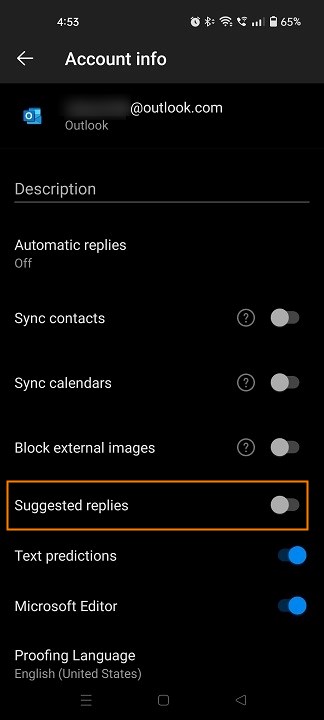
- Tap the toggle button next to the Suggested replies option.
You’re all done! From now on, you won’t see a trace of suggested replies on your mobile phone.
Or maybe… get your own advanced suggested replies
If you’ve just achieved the desired effect, I’m glad I could help you. If you happen to change your mind in the future, you can always come back and follow the same instructions to re-enable the Outlook suggested replies.
If you like the feature in general but, at the same time, look for an ability to create and use replies that can be:
- more extensive and can convey the entire message (e.g. ready-made paragraphs or an entire reply concerning a particular sales or support case, and so on),
- fully customizable in terms of looks and content (fonts, colors, links, etc.),
- compatible with Microsoft Entra ID (Azure Active Directory) attributes and custom attributes (to store whatever you want), or
- freely selected as pre-defined templates in Outlook for Windows/Mac or OWA, depending on which reply is needed,
have a look at our guide on canned responses. To use the functionality of the canned responses you need a subscription of our flagship cloud email signature management solution, CodeTwo Email Signatures 365. If you would like to give it a try, it comes with a free 14-day trial version.
See also:
- How to use the Blocked Senders / Safe Senders list in Outlook
- How to configure your Outlook out of office messages in Outlook
- How to export Outlook contacts to CSV, PST and VCF files
- How to import Outlook contacts to another Outlook or Gmail